
Why Nollie Controllers Use Molex Over SATA (Power & Loose Pins Explained)
Why loose Molex pins are normal by design, and how dual Molex prevents the dangerous SATA power death trap.
- Loose, wobbly pins inside 4-pin Molex (PATA) plugs are floating pins designed by specification for mating tolerance.
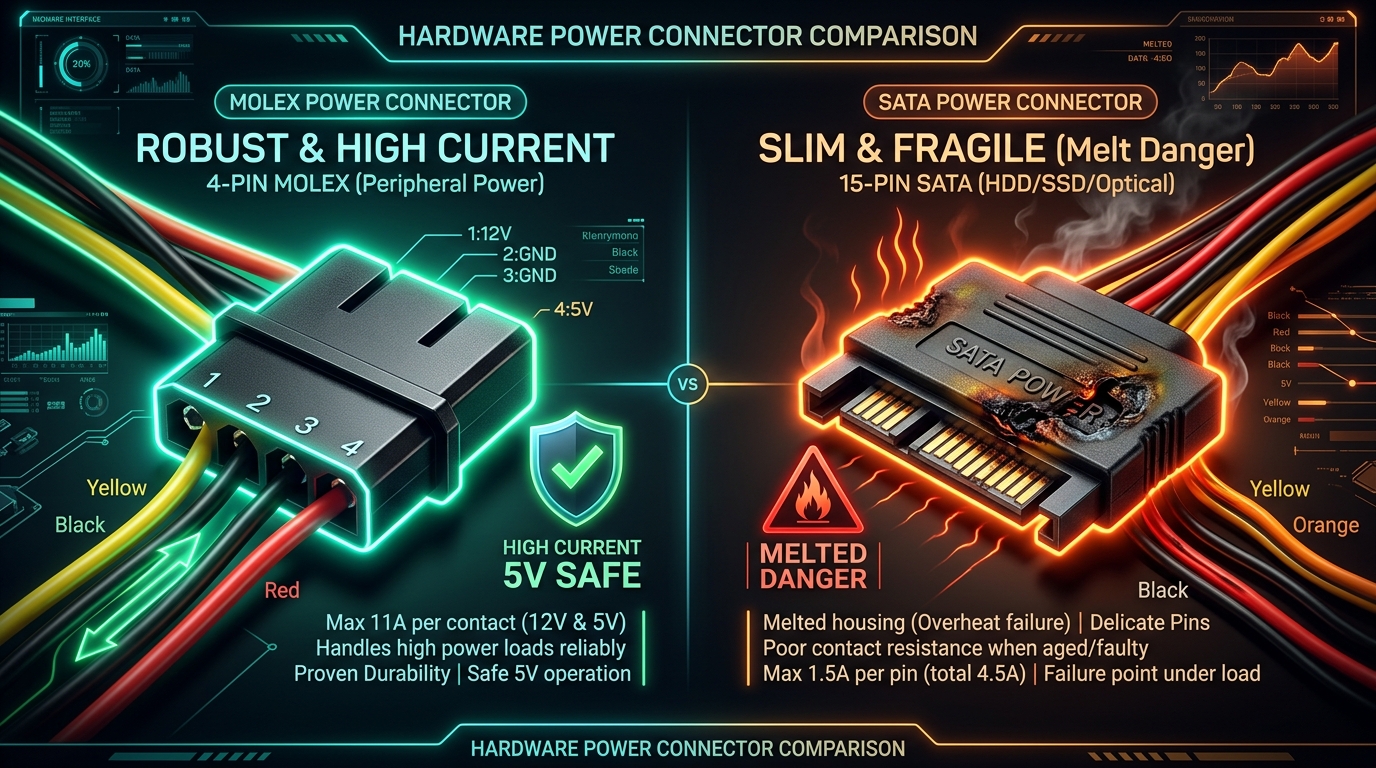
- SATA power connectors are limited to 4.5A total on the 5V rail, creating a severe melting and fire hazard under heavy ARGB loads.
- High-end ARGB setups with 300 to 1,000+ LEDs demand 10A to 15A+ of continuous 5V DC power.
- Dual Molex connectors deliver up to 22A of safe continuous 5V current, ensuring maximum LED brightness without voltage sag or melted cables.
When unboxing your Nollie 16 or Nollie 32, two questions frequently arise regarding power delivery:
- “Why do the metal pins in my Molex connector wobble and feel loose?”
- “Why does a flagship 2026 controller use classic 4-pin Molex instead of modern SATA power?”
Both questions come down to mechanical engineering, electrical safety, and the massive power demands of addressable RGB lighting.
Are Your Molex Pins Loose or Wobbly? It’s Completely Normal!
If you inspect your Molex-to-XT30 power cable and notice the metal pins wiggle inside the plastic housing, do not panic—your cable is NOT broken or defective.
The 4-pin peripheral connector (originally designed by Molex and AMP as the Commercial MATE-N-LOK standard) intentionally uses floating pins:
- Mating Tolerances: Because the connector features four large 2.13mm cylindrical pins, rigid pins would easily bind, jam, or bend if there were even a 0.5mm misalignment between the male and female plugs.
- Self-Centering: The deliberate clearance inside each nylon chamber allows each pin to independently float, wiggle, and smoothly guide itself into the matching socket during insertion.
Builder Tip:
If a pin pushes backwards slightly when connecting to your PSU cable, simply gently wiggle the connector from side to side while pressing firmly, or guide the rear wire forward so the pin locks securely into the female terminal.
Why We Choose Molex Over SATA?
Modern PC builders love SATA power cables because the slim, molded L-shaped plug is easy to route behind the motherboard tray. However, using SATA to power a flagship ARGB controller is an electrical disaster waiting to happen.
The SATA Current Bottleneck (4.5A Limit)
The SATA power specification was designed exclusively for storage drives (3.5” HDDs, 2.5” SSDs, and optical drives)—devices that consume only a few watts of power.
The standard 15-pin SATA power connector assigns only 3 tiny leaf contacts (pins 7, 8, and 9) to carry the +5V power rail:
- Each SATA pin is rated for only 1.5 Amps maximum.
- Across all three parallel pins, a SATA connector has an absolute theoretical ceiling of 4.5 Amps at 5V (22.5 Watts) under ideal laboratory conditions.
The Math of High-End ARGB Lighting
Addressable RGB LEDs (WS2812B, SK6812, WS2811) run on 5V DC. At full 100% white (red, green, and blue dies fully illuminated), each single LED consumes up to 60mA (0.06A):
| LED Count | Typical Build Hardware | Peak 5V Current | Total 5V Power | Can a Single SATA Port Handle It? |
|---|---|---|---|---|
| 50 LEDs | 2-3 standard fans | 3.0 A | 15 W | ✅ Safe |
| 100 LEDs | 4-5 fans + CPU block | 6.0 A | 30 W | ❌ Exceeds SATA (4.5A Max) |
| 250 LEDs | 8 fans + 2 LED strips | 15.0 A | 75 W | ❌ Dangerously Overloaded |
| 500+ LEDs | 10+ fans, Lian Li Strimers, distro plate | 20.0 A+ | 100 W+ | ❌ Instant Fire / Melt Risk |
Flagship controllers like the Nollie 16 (16 dedicated channels) and Nollie 32 (32 channels plus dedicated Lian Li Strimer 24-pin and Dual 8-pin headers) routinely manage 500 to 1,500+ LEDs in enthusiast builds.
The SATA “Power Death Trap”: Melting, Fire & Dim LEDs
Attempting to draw 10A to 15A+ of current through a flimsy SATA connector causes two catastrophic issues:
1. Fire and Melted Plastic (The “Death Trap”)
Electrical heat generation follows Joule’s Law:
⚡ Joule’s Heating Law:
Power Loss (P) = I² × R
(Heat generated increases with the square of current multiplied by resistance)
Because heat scales with the square of current, doubling the amperage quadruples the heat generated across the contact pins. Drawing 12A through contacts rated for 4.5A causes the tiny SATA leaves to glow red-hot, melting the plastic housing, welding pins together, and creating an extreme short-circuit and fire risk.
2. Severe Voltage Sag (Dim & Discolored LEDs)
Under high resistance and excessive current, the 5V line sags dramatically—often dropping below 4.2V before reaching your fans:
- Loss of Brightness: LEDs fail to reach full punch and brilliance.
- Color Distortion: Pure white effects shift to a sickly orange or dirty yellowish tint towards the ends of strips and fans.
- Controller Lockups: Voltage drops starve the controller’s onboard microcontroller, causing random USB disconnects and effect freezes.
The Engineering Solution: Dual Molex + XT30
To guarantee rock-solid safety and maximum lighting performance, Nollie 16 and Nollie 32 use a Dual Molex to XT30 architecture:
- Heavy-Duty 2.13mm Brass Pins: A single Molex +5V pin is rated for 11 Amps continuous.
- Dual Parallel Rails: By combining two Molex connectors in parallel, the harness can deliver up to 22 Amps of safe continuous 5V DC power without generating heat.
- RC-Grade XT30 Connector: The high-amperage gold-plated XT30 connector on the controller PCB features virtually zero contact resistance.
- 15A Onboard Safety Fuse: Protects your PC components, wiring, and power supply against accidental external short circuits.
Always connect BOTH Molex connectors on the Nollie power harness to your power supply. Using both connectors splits the high current evenly across two separate PSU pins, ensuring zero heat buildup and maximum LED brightness.