
Recording UtilitySoftware·3 min read·Sep 30, 2026
How to Use Nollie FSEQ Studio
Record OpenRGB & SignalRGB USB lighting effects into .fseq animations and channel maps for hardware playback.
N
nuonuo
Nollie Team
Key Takeaways
- Install USBPcap driver (included in Wireshark installer) and reboot before running capture.
- Run nolliecapture.exe as Administrator while your RGB software is actively sending effects.
- Load the generated _chmap.json and .fseq file into NollieRGB's FSEQ page for standalone hardware playback.
Nollie FSEQ Studio records live lighting data sent by OpenRGB or SignalRGB over USB to a Nollie16 or Nollie32 controller, saving it as a hardware-ready .fseq sequence file alongside a matching _chmap.json channel map.
This allows you to capture intricate software-driven RGB effects and play them back directly on your Nollie hardware without needing RGB software active in the background.
One-Time Setup
- Download Nollie FSEQ Studio.
- Download and install USBPcap from https://desowin.org/usbpcap/ (the standard Wireshark installer also includes USBPcap). Reboot your system after installation.
- In OpenRGB or SignalRGB, configure your Nollie controller channels and LED counts as usual.
How to Record Effects
- Start your effect inside OpenRGB or SignalRGB so lighting packets are actively broadcasting over USB.
- Double-click
nolliecapture.exeand accept the Administrator prompt (USB packet capture requires elevated privileges). - The terminal window will display:
Found a Nollieand start a live frame counter.
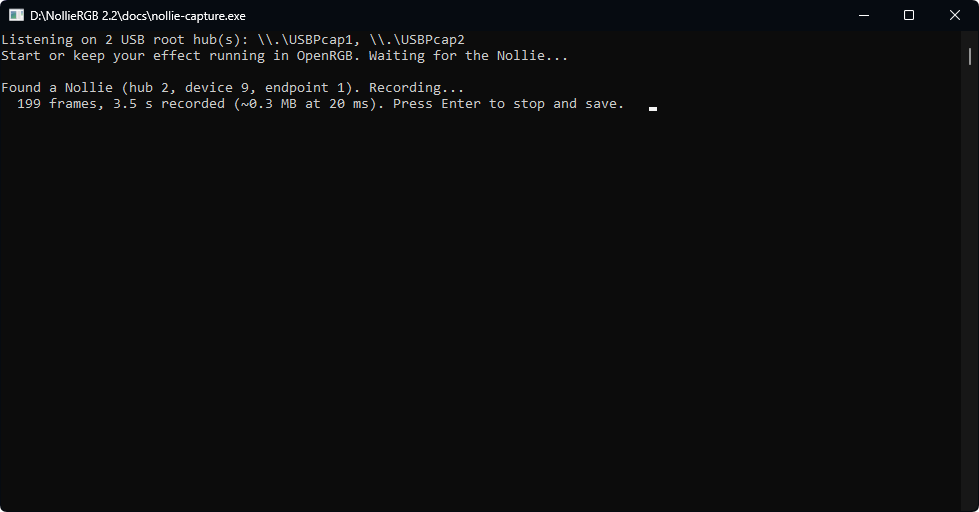
- Let the animation play for your desired duration, then press Enter to stop recording.
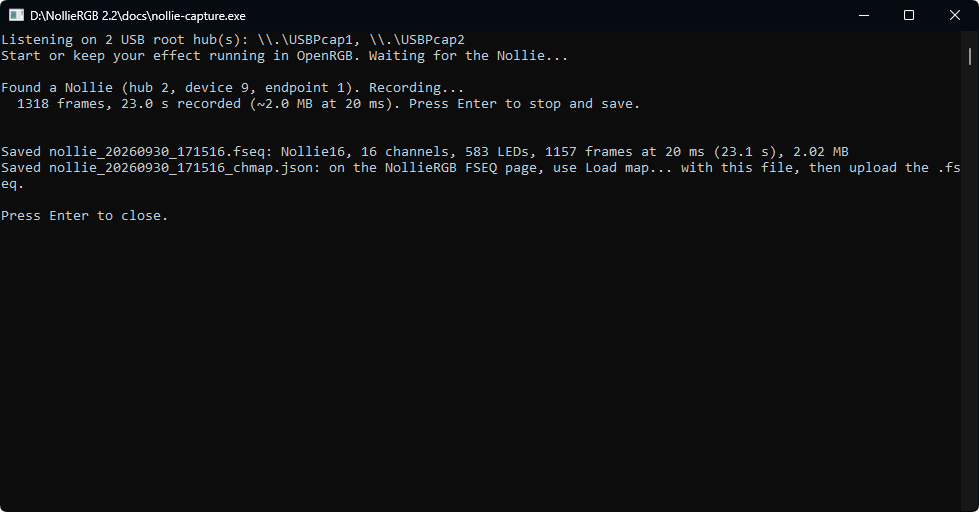
- The tool will save two files in the directory where
nolliecapture.exewas executed:nollie_<date>_<time>.fseq(The raw animation sequence)nollie_<date>_<time>_chmap.json(The channel mapping metadata)
Playing .fseq Animations on Nollie Hardware
- Open NollieRGB client.
- Navigate to the FSEQ page 1️⃣.
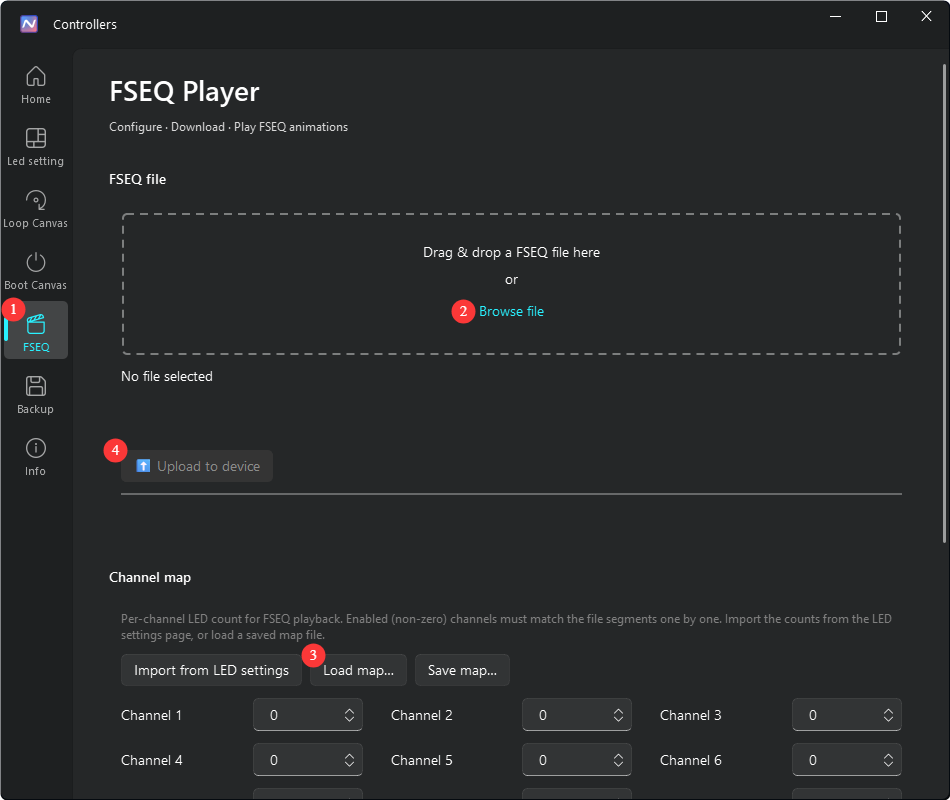
- Click Load Map and select your generated
_chmap.jsonfile 3️⃣. - Upload the matching
.fseqsequence file 2️⃣. - Click Play to test or persist the effect on hardware!
Advanced CLI Options
If you launch nolliecapture.exe from a Command Prompt or Terminal, you can pass optional arguments to customize capture behavior:
| Option | Description |
|---|---|
--step 33 |
Milliseconds per frame (default: 20 ms / 50 FPS). Use 33 ms (30 FPS) for dense LED counts or long captures to conserve space. |
--seconds 30 |
Automatically stop recording after the specified number of seconds (e.g., 30s). |
--out name |
Set custom output filename prefix (without extension). |
--pcap file.pcapng |
Convert an existing Wireshark / USBPcap capture file instead of capturing live. Dragging a .pcapng file onto nolliecapture.exe does the same. |
--model nollie32 |
Force a specific controller model if auto-detect fails (affects channel naming in map). |
--usbpcapcmd path |
Specify custom path to USBPcapCMD.exe if not in C:\Program Files\USBPcap. |
Memory Limits & File Size Guidelines
- Nollie controllers support storage of
.fseqfiles up to 16 MB. - During recording, the live console counter displays the projected file size in real time.
- If projected size approaches the 16 MB limit,
nolliecapture.exewill output a warning. Use--step 33or limit recording duration if file size exceeds hardware capacity.